
CSU Fully Online
Students will be able to access CSU Fully Online through their Student Center beginning July 27, 2026.
The listings of online courses being offered Fall 2026 will be posted in mid-May 2026 on the CSU Fully Online website. Students should consult with their academic advisor to determine whether a CSU Fully Online course will apply to their degree requirements.
CSU Fully Online is a concurrent enrollment program that allows CSU students to take one online course at another CSU campus during the fall or spring semester along with coursework at their home CSU campus.
Eligibility Requirements
To participate in the program, the student must have:
- Completed at least one term and earned at least 12 units at Cal Poly as a matriculated student.
- New incoming transfer students are eligible to enroll and do not have to meet the 12 earned units and 2.0 GPA during their first term at Cal Poly provided all other criteria are met.
- International students on a F-1 visa require pre-authorization from the International Center and students on a J-1 visa are ineligible.
- Earned at least a 2.0 GPA at Cal Poly
- In good standing
- Enrolled at Cal Poly during the period of concurrent enrollment
- Paid tuition fees as a full-time student*
One course per semester is permitted as part of the CSU Fully Online program, unless the course has a co-requisite course.
*Systemwide tuition is charged by the home CSU. No additional systemwide tuition is charged by the host CSU for the course. If applicable, non-resident fees are charged by the host CSU as well as any other applicable fees such as material/lab fees and the Graduate Business Professional fees.
Before you contact us
Fall 2026 is the first semester that Cal Poly students are eligible to participate in the CSU Fully Online program. As we launch this systemwide opportunity, we anticipate students will have questions.
Please review the information and resources below to learn about the program, the courses offered, and host campus enrollment before contacting advisors or the Office of the Registrar:
Registration for Fall 2026 CSU Fully Online courses will open July 27, 2026.
Campus Specific Information
San Luis Obispo
Please carefully review the eligibility, enrollment, and registration information available on this website. Questions can be directed to cpfullyonline@calpoly.edu or your academic advisor.
Solano
Students should consult with their program advisor to determine whether a CSU Fully Online course will satisfy major requirements. For general registration questions, students may contact Maritime Academy Advising Center and cpfullyonline@calpoly.edu.
Student Guide to Enrolling in CSU Fully Online
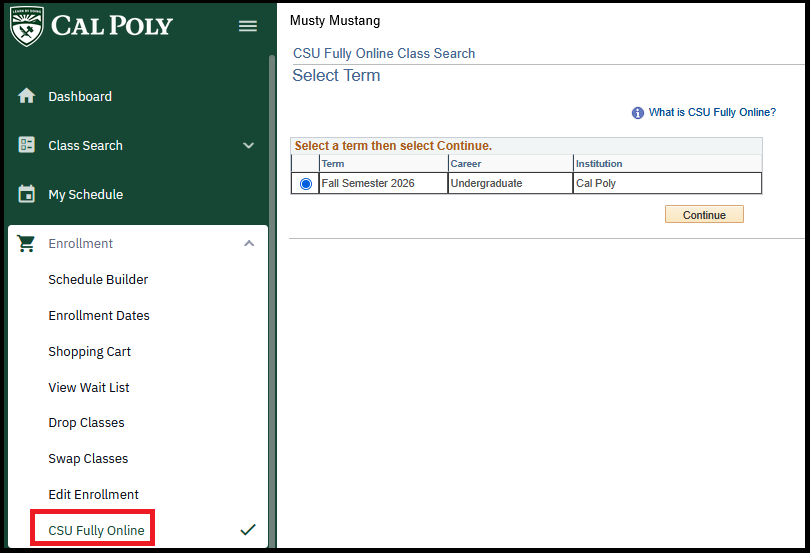
To enroll in CSU Fully Online, log in to your Cal Poly Student Center. Under Enrollment, select CSU Fully Online, select the term, and click Continue to be taken to the CSU Fully Online Class Search.
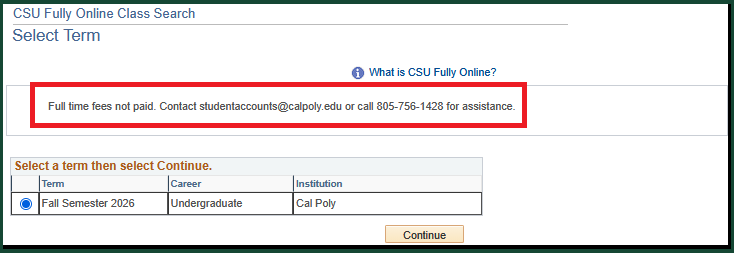
Note: If you have not paid full time fees for the term selected, you will receive the following message.
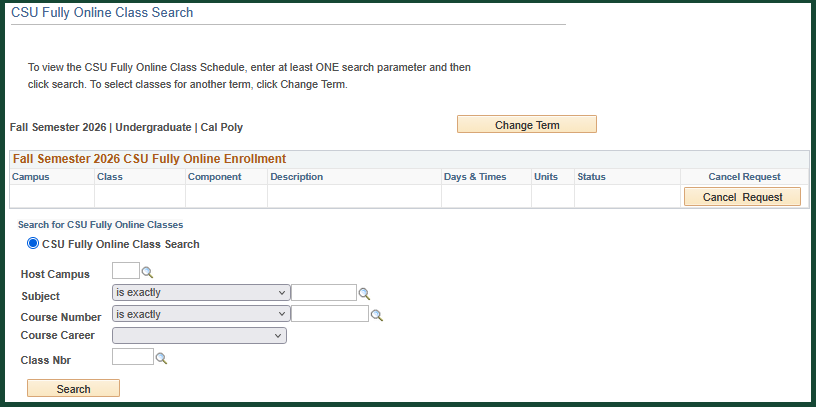
In the CSU Fully Online Class Search screen, you can search by the Host Campus number, course subject, course number, course career (undergraduate or graduate), or class number. Enter a search value and click Search.
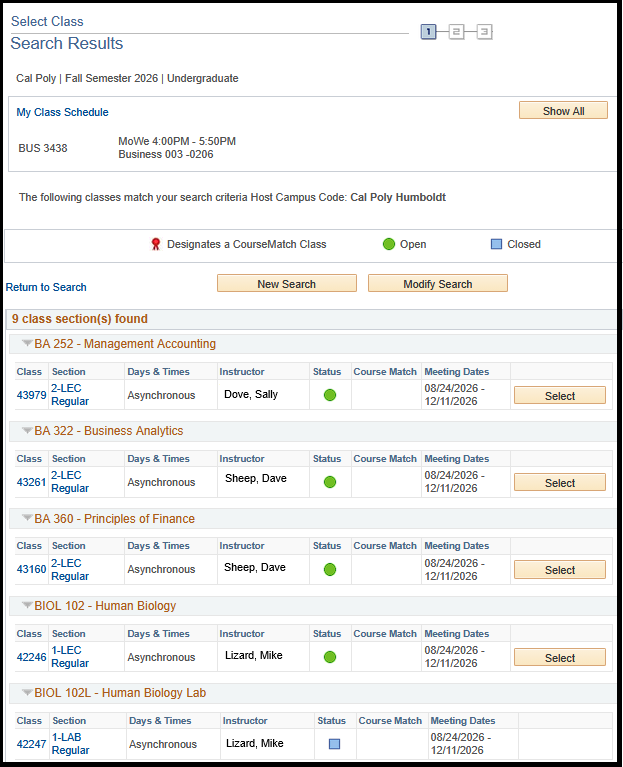
The search results will display the open classes that are available as of the date and time of your search. If the search returns no results, it could be that there are no open classes or the enrollment period for the CSU campus has closed.
To review the course description, click the Class number link.
If you want to see what other classes are available, click New Search or Modify Search. When you are ready to request enrollment in a class, click Select.
Note: Review the course description carefully.
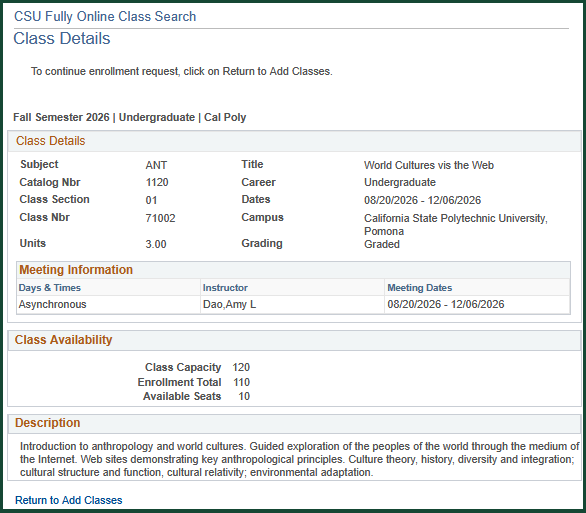
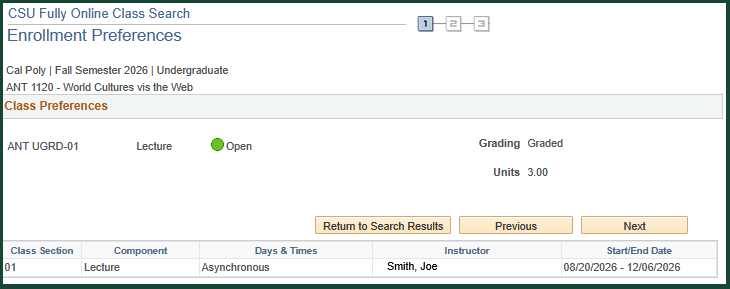
After selecting the class, review the Enrollment Preferences, click Next to continue the enrollment process, or click Return to Search Results to review or select a different class.
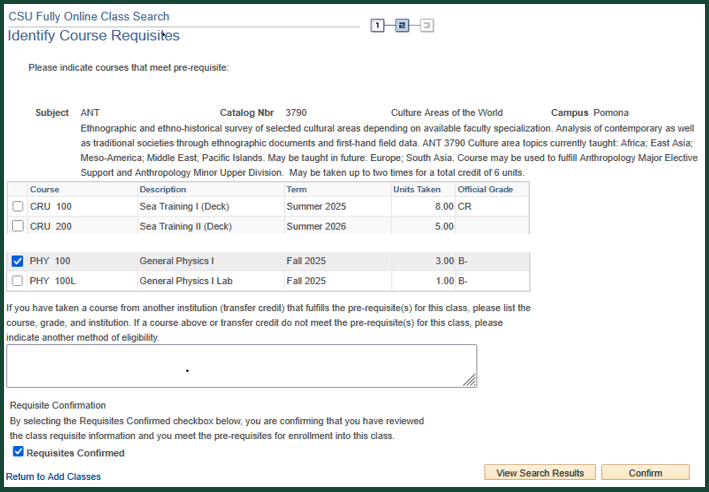
If the class you selected has prerequisites, you may be asked to identify which of your completed courses fulfill the course requisites. If the CSU campus has any questions or needs a copy of your transcript to verify you have completed the requisites, they will contact you directly.
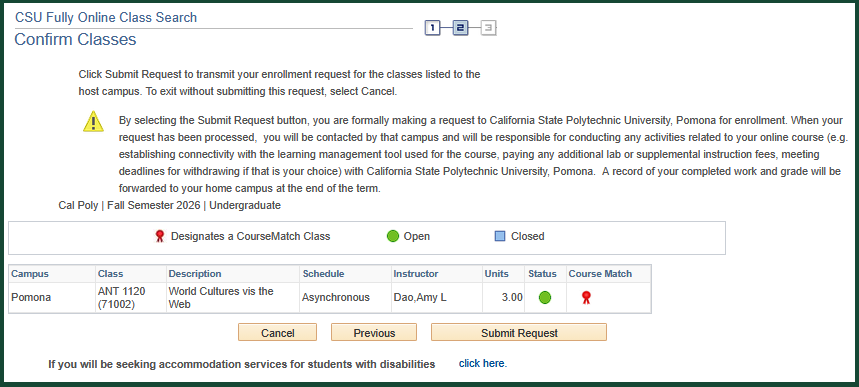
Review the Confirm Classes statement and the class information. If the information looks correct, click Submit Request.
In the View Results screen, review the status, click OK, and the system will take you back to the enrollment screen.
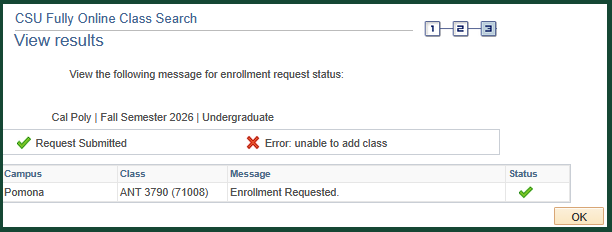
Review the enrollment status and messages. After requesting enrollment, the status displayed is "Requested". As the CSU campus reviews your request, you may see the status of "Pending", which means they are reviewing your request to enroll. When the CSU campus enrolls you in the course, the status will change to "Enrolled", and they will send you a Welcome email with further instructions, so watch your email.
When a requested class is full, closed, or you do not meet the course requisites, the status may be "Not Enrolled-Class Full" or "Not Enrolled-Other Reason".
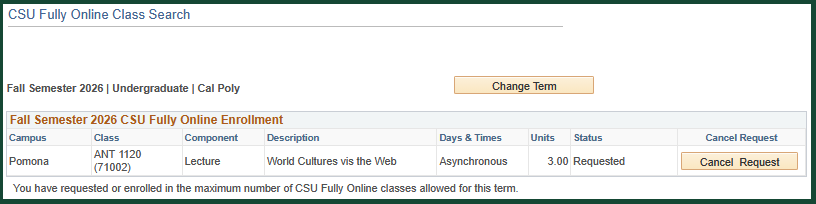
If you decide to cancel the enrollment request, you may do so through the CSU Fully Online Class Search as long as the status is "Requested". Once the status changes to "Processing" or "Enrolled", you will need to contact the CSU campus directly to request they drop you from the class. Once the term begins at the CSU campus, if you need to withdraw from the class, you will need to follow the CSU campus's drop deadlines and policy for withdrawing from the course.