
Drops, Withdrawals, and Leaves
Note for Newly Admitted Students
The information on this page cannot be used to defer or decline admission to Cal Poly. To inquire about an admission deferral, please email admissions@calpoly.edu.
Dropping Classes
Remove class(es) from your schedule during the drop period at the start of the term.
The last date to drop classes is published in each term's Planning Calendar.
Dropping below full-time status
Full-time status is reached when you are enrolled in at least 12 units as an undergraduate student and at least 9 units as a graduate student. Reducing your course load below full-time prompts changes to tuition, fees, and financial aid awards.
Some programs or services — such as financial aid, housing, internships, or even your car insurance — may have minimum-unit requirements. It’s a good idea to contact these services when you’ll be enrolled in fewer than 12 units (undergraduate) or 9 units (graduate).
If you plan to drop all of your classes and take the term off, please read the section below titled "Taking Time Off".
Reasons to drop a class may include
- The class you’re enrolled in conflicts with another class you’d like to add.
- You enrolled in more units than you can reasonably successfully complete in the term.
- You attended the first few days of class and don’t feel ready to take this class yet.
Timeline and Process
- Check for the “Last day to drop classes” on the relevant term’s Planning Calendar.
- When possible, we recommend dropping classes before the term has begun. Tuition and fee refunds are determined by the Fee Refund Policy. Contact Student Accounts for information and assistance.
- Review this demo on how to drop classes.
Administrative Drops
Although your enrollment is your responsibility, you may be administratively dropped from an enrolled class or a waitlisted class for any of these reasons:
- The section or course was canceled. You’ll receive an email if this happens to you. Departments try their best to make accommodations for students in canceled sections, but you may need to find your own alternative class.
- You don’t meet prerequisites. “Post-Enrollment Requisite Checking,” or PERC, is an automatic process that runs at the end of the term after grades are posted. PERC confirms whether you have completed all prerequisites that were in progress when you enrolled for next term’s classes. If a prerequisite is not completed, you may be automatically dropped from the next course.
- Missing the first meeting(s) of a class: If you’re unable to attend the first class meeting, even for an asynchronous online class, make sure to contact your instructor via email. Instructors may choose to drop any student who is not present at the end of the first meeting of any lecture, lab, or activity. If you’re enrolled in a lab/lecture combination, be sure to attend both parts of their first meetings.
Even if the above is true, do not assume that you will be dropped from a class. It is your responsibility to drop all unwanted classes. If you have been dropped from a class and need help finding a replacement, contact the Mustang Success Center (first-time, first-year students) or your College Academic Advising Center (year 2 and up and all transfer students).
Withdrawing from Classes or the Term
Request to remove in-progress class(es) from your schedule after the last day to drop classes.
Updated as of Fall 2026; please read carefully.
Withdrawals require approval and are not guaranteed. We highly recommend you communicate with an advisor when considering a withdrawal.
Maximum Units
- Undergraduate students: You are limited to withdrawing from no more than 18 units during your time at Cal Poly - quarter and semester units will count one-for-one. If your withdrawal has been verified as serious and compelling and beyond your control, those units will not count toward this limit.
- Graduate students: There is no unit maximum set for withdrawal for students in graduate standing. However, withdrawal from all or a substantial portion of a program of study in two consecutive terms or any three terms could lead to administrative-academic probation. Students should work with their graduate coordinator and/or Graduate Education when exploring withdrawals.
- To check how many withdrawal units you have used, open your Student Center from your main Cal Poly Portal. Then, select Academic Progress from the menu on the left, and click Withdrawals/Repeats.
Timing
Withdrawing within the First 80% of Term
During the first 80% of regular instruction, you may withdraw for any serious and compelling reason.
If the reason is serious and compelling, but within your control, it will count toward your 18-unit limit - quarter and semester units will count one-for-one. If the reasons are found to be beyond your control, the withdrawal will not count toward your 18-unit maximum.
Examples of Serious and Compelling Reasons Within Your Control:
- You registered for an incorrect class
- You took on too many responsibilities this term and need to scale back
- You’ve changed your plans or your major
- You thought you’d been dropped from the class and haven’t been completing the work
- You’ve had trouble accessing materials needed for class
Information regarding the date and time deadline for the last date to withdraw for reasons within your control can be found on the planning calendar for each term.
Withdrawing within the Last 20% of Term
During the last 20% of regular instruction, you may only withdraw for reasons that are determined to be beyond your control.
Withdrawals for reasons beyond your control are allowed until the last day of regular instruction, and do not count toward your 18-unit maximum. All serious and compelling withdraw requests will be reviewed by your college's Associate Dean, who will determine how units apply toward your 18-unit maximum allotment.
Examples of Serious and Compelling Reasons Beyond Your Control:
- A crisis or emergency of any kind
- Mental health concerns
- Physical health concerns
- Financial concerns
- Family obligations
Information regarding the date and time deadline for the last date to withdraw for reasons beyond your control can be found on the planning calendar for each term.
Note: Withdrawals are not allowed during finals week. If you can’t complete your final, please contact your instructor about the possibility of an incomplete grade instead.
Retroactive Withdrawals
Petition for all grades in a previous term to be retroactively changed to the administrative grade of W.
Considerations
- Retroactive withdrawal petitions for a given term must be submitted within one calendar year of the last day of the term you want to retroactively withdraw from. Petitions submitted after one year has passed will not be considered.
- A retroactive withdrawal, if granted, applies to all classes you were enrolled in for the term. In other words, you must petition to withdraw from the entire quarter.
- You will need to explain and document the circumstances that resulted in poor grades and interfered with your ability to withdraw by the deadline for that term.
- You do not have to be enrolled at Cal Poly when you submit the retroactive withdrawal petition.
- Refunds of tuition and fees are not granted for retroactive withdrawals. For more information, please contact Student Accounts.
- If your petition is approved, you will receive a ‘W’ grade symbol for all your courses. W grades carry no adverse connotation of your performance and will not be used in calculating grade point averages.
Process
- Contact the Records Unit of the Office of the Registrar to request to start the Retroactive Withdrawal process.
- Check your Cal Poly email for a follow-up email and the form request to sign and submit.
- Your petition will be submitted to the Committee for Retroactive Withdrawal for discussion, evaluation, and decision. The committee generally meets once a month.
- It is recommended that you meet with an academic advisor or retention specialist for tips and guidance.
- Once a decision has been reached, the Office of the Registrar will notify you of the decision via the email address provided on the petition.
Withdrawal Process
What Happens Next
- Request access to the Withdrawal Petition Form by using the link found in the Form Links section below.
- When you request access to the form, please double-check that all information — especially your Cal Poly email address — is accurate.
- Your College Advising Center will initiate the form on your behalf.
- You will receive a link to the Adobe Sign Withdrawal Petition Form via your Cal Poly email (subject line: "Signature requested on 'Withdrawal Petition Form'"). This may take up to 3 academic business days. If you don’t receive the form, be sure to check your junk folder.
- Fill out the form from your email as soon as possible (within 1-2 days) and submit electronically.
- It is generally to your benefit to include more information rather than not enough. If you’re not sure what to include in your comments, please reach out to your academic advisor or retention specialist.
- Though it is not required, you may attach any accompanying documentation that supports your request.
- The “last date of attendance” box is asking when you last attended class or spoke with your instructor (including in an email). This is verified by Financial Aid and Student Accounts to determine your refund eligibility for term withdrawals.
- Your instructor will be notified of your withdrawal. However, we recommend connecting with your instructor(s) before to ensure that a withdrawal is appropriate for your situation.
- Your college Associate Dean will review your request. This may take up to an additional 3 academic business days after you have submitted your form.
- You may be asked via email to provide additional information or clarification.
- If your withdrawal petition is denied: You are expected to complete course requirements.
- It may be appropriate to contact your instructor about the possibility of an Incomplete grade instead.
- If your withdrawal petition is approved, you will receive a copy of the completed form. It may take a few days for withdrawal(s) to be reflected in PolyProfile.
- You'll receive a W or W(W) grade symbol and are not expected to attend class or complete coursework.
- If the class is required for your degree, you will need to complete it in the future.
- Your next attempt does not count as a repeat and won’t use any of your repeat units.
- Undergraduate students: Please update Degree Planner to reflect when you plan to take this class/these classes in the future.
Important Considerations
Depending on the day of the term when you initiate a withdraw request and the number of units you remain enrolled in, withdrawing may change your circumstances. Please consider the following:
Tuition and Fees
You may have to pay full tuition and fees for the term. Adjustments and refunds are determined by the Fee Refund Policy. Contact Student Accounts for information and assistance.
Financial Aid
Your Financial Aid award and your Satisfactory Academic Progress (SAP) may be impacted. Contact Financial Aid for information and assistance.
University Housing
University Housing requires students to be enrolled in classes to continue living on campus. If you are withdrawing from all classes for the term (i.e., term withdrawal), contact Housing at housing@calpoly.edu for information and assistance with canceling your housing contract.
Insurance Coverage
Insurance provider(s) may have enrollment thresholds in order to maintain coverage or certain discounts. Contact your insurance company directly.
- Withdrawals are notated with a W or W(W) grade symbol on your transcript and/or in your Poly Profile (the "W(W)" grade symbol only appears in Poly Profile).
- Neither of these grades factor into your GPA, as they are not indicators of your performance in the class.
- An occasional W on your transcript is a fairly common occurrence and nothing that should jeopardize your future career or your plans for graduate school, professional school, etc.
- Note: W and W(W) are different from WU (Withdrawal Unauthorized). Read about all grading symbols.
- Note: You are eligible to take one term of Informal Time Off after each term of enrollment (applies to undergraduate students ONLY; please see "Taking Time Off" below). As long as you received W or W(W) grade(s), a withdrawn term counts as a term of enrollment.
Taking Time Off
Temporary, short-term or long-term break from Cal Poly
Time Off Options
Undergraduate Students: We encourage you to start with Informal Time Off before taking a Leave of Absence.
Graduate Students: Since you are subject to the Continuous Enrollment policy, we recommend starting with a Leave of Absence.
Informal Time Off (ITO)
Informal Time Off is a short-term leave for one semester.
- You must attend Cal Poly for one term before you are eligible to take Informal Time Off. Please email admissions@calpoly.edu if you do not plan to attend your first term at Cal Poly.
- Informal means there’s no change to your status or ability to register for classes.
- Students may take one semester of ITO before discontinuation. In other words, if you do not enroll for a second term, you will be discontinued from Cal Poly. *Summer does not count as a term of ITO
- There is no limit to the number of times you can take ITO as long as you re-enroll and attempt/complete a term at Cal Poly between ITO periods. Taking classes (including summer) at Cal Poly resets your eligibility to take the next semester off. For example, if you took spring semester off but enroll in summer classes at Cal Poly, you may take ITO again for the fall semester.
Semester Conversion: Students who took their first term of ITO in spring term 2026 may also take fall semester 2026 as ITO. You must enroll in classes or take LOA a formal Leave of Absence starting spring 2027. See “Leave of Absence (LOA)” section below
ITO Next Steps
- Submit the Informal Time Off Notification Form
- This serves as a notification that you’ve decided to take ITO, but no approval is necessary.
- You may change your mind by enrolling in classes.You do not need to submit anything to cancel your ITO.
- This form will not drop or withdraw you from any classes.
- Drop (or do not enroll in) all classes for the term you wish to take off.
- You may remove/drop your class(es) from your Student Center during your enrollment appointment, Open Enrollment and through the end of the drop period. Dates can be found in each term’s enrollment calendar. Instructions for dropping classes.
- Check your expected graduation date in your Poly Profile or your Student Center.
- Graduation term not set yet = no action needed
- Graduation term set, but you'll be attending and completing remaining degree requirements during the term you are expected to graduate = no action needed
- Graduation term set for a term you’ll be away = submit a Request to Extend Graduation Term form as soon as possible
- Set a calendar reminder to check for your future registration appointment.
- Tip: Enrollment appointments for the next term are viewable the same day the class schedule is released (see the Planning Calendars for dates)
- The Retention team will email you with next steps and reminders about registration. We also recommend reviewing Retention’s suggestions for navigating time off.
Leave of Absence (LOA)
A Leave of Absence (LOA) is a long-term leave that allows you to be away for up to four (additional) semesters (a total of two years).
- Your status will change from “Active” to “Leave of Absence,” so you will not be able to register for classes until your LOA is ending.
- Undergraduate students: We highly recommend taking Informal Time Off for one semester before beginning a Leave of Absence (see section above).
- Graduate students: Taking a Leave of Absence is allowed under the Continuous Enrollment policy.
Policy
- You must attend Cal Poly for one term before you are eligible to take time off. Please email admissions@calpoly.edu if you do not plan to attend your first term at Cal Poly.
- You may request up to one year (two semesters) of leave at a time.
- If your LOA will be longer than one year, you will need to request an extension near the end of your first year of leave.
- You may not take more than four regular semesters of LOA (two years) throughout your time at Cal Poly.
- Exceptions apply for leaves taken due to active duty for the U.S. Military. Please review the information for Military-Connected Students at the bottom of this page.
- Summer is not considered a “regular academic term,” and is not counted as a term of LOA.
- If you do not return at the end of your LOA, you will be discontinued from Cal Poly.
*Important: If you took LOA during quarter-based ;terms and need additional terms starting fall 2026, please see details below to help determine the remainder of your two-year allowance.
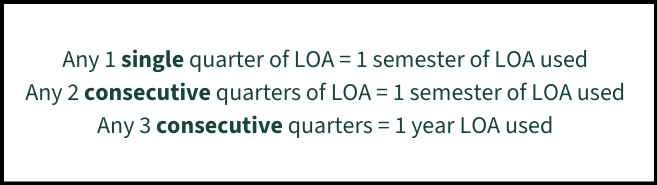
Eligibility
You are eligible for a Leave of Absence if:
- You have attended Cal Poly for at least one semester.
- You are NOT currently discontinued, suspended, or expelled from the university.
- You have NOT already taken two years (four semesters) of LOA.
LOA Next Steps
LOA forms are due by the first day of the term your leave begins. To avoid processing delays, please submit your LOA form early. The Academic Calendar lists term start dates.
Tips for filling out the form:
- Remember that you can request up to two regular semesters per form (do not count summer).
- List your start and return dates as “term + year” (e.g., start Fall 2026; return Spring 2027). Please double check the year of your return date.
- Once submitted, the form cannot be edited. Contact your retention specialist for support changing these dates.
- Initiate the appropriate LOA form using the link found in the “Form Links” section below. When you complete this initial form and hit "Submit," a blank copy of the appropriate LOA form will be sent to your Cal Poly email address.
- Complete the form.
- Find the email titled "Signature Requested – Leave of Absence” in your Cal Poly inbox (or junk folder) and fill out the form via Adobe Sign.
- Check your expected graduation term in your Poly Profile or Student Center. If your grad date is set for a term that you will be away, you’ll need to request to extend it.
- Graduation term not set yet = no action needed
- Undergraduate students: submit a Request to Extend Graduation Term form
- Graduate students: submit a Change of Degree Completion Term form
- Your Retention Specialist or Graduate Academic Advisor will contact you after you have submitted your signed form, so please check your email regularly.
Changing the Length of Your LOA
- To return early, complete a new Leave of Absence form with an updated return term.
- Although you can submit an updated leave form at any time, be mindful of registration periods so you don't miss your next enrollment appointment.
- To extend your leave, complete a new Leave of Absence form with updated start and return dates.
- You are eligible for an extension if you have not yet taken four total semesters or two years of LOA.
- Extensions must be requested before the first day of your original term of return. See the Academic Calendar for term start dates.
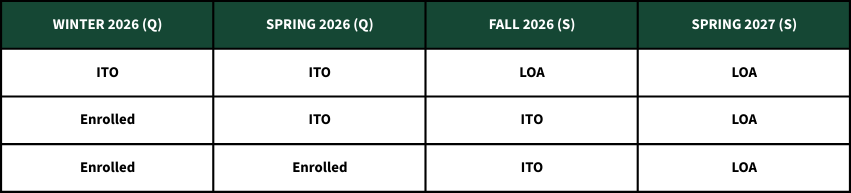
Tracking Time Off through the Semester Conversion
Transition details and scenarios:
- Students who took winter 2026 + spring 2026 as ITO must enroll or begin LOA in fall 2026.
- Students who took their first quarter of ITO in spring 2026 may also take fall semester 2026 as ITO. Students must either enroll in courses or take LOA starting spring 2027.
- All students who take fall 2026 as ITO must begin LOA or register for spring 2027.
-
For interpreting number of LOA terms used or remaining, use the following conversion chart. If questions arise, please reach out and confirm with your retention specialist!
Returning from Time Off
To return from taking any time off, you will need to register for classes during normal registration periods.
- While on ITO, you will continue to receive an enrollment appointment for every term.
- If you are on LOA, you will only be assigned an enrollment appointment the term before your LOA ends (to register for your return term).
- Review Retention’s Returning from Leave website for helpful guidance and information.
We recommend contacting your academic advisors before registration begins for help with planning your class schedule.
University Departure
Discontinuing or separating from Cal Poly
We trust that you have given this decision a lot of thought. While we are sorry to see you go, we understand that leaving Cal Poly may be the best choice for you.
By submitting a Departure form, you are requesting to be discontinued from the university and will no longer be a Cal Poly student. If you decide to return in the future, you will have to apply for readmission.
Note for Newly Admitted Students: The information on this page cannot be used to defer or decline admission to Cal Poly. To inquire about an admission deferral, please email admissions@calpoly.edu.
Note for Graduate Students: Please contact Graduate Education at grad@calpoly.edu if you plan to depart from Cal Poly.
Considerations
Before departing, you may want to consider or prepare for:
- Other options for taking time off listed above
- Transferring to another college or university
- Potential changes or disruptions to important services and programs. For example:
- Financial aid awards and repayment status
- Housing eligibility or affordability
- Insurance rates and coverage
- Eligibility for other benefits (e.g., Cal Fresh)
- Internship eligibility
- Other Cal Poly services
Please reach out to your retention specialist if you need help navigating these scenarios.
Next Steps
- Initiate the appropriate University Departure form using the link found in the "Form Links" section below. When you complete this initial form and hit "Submit," a blank copy of the University Departure form will be sent to your Cal Poly email address. This form does not drop or withdraw you from any enrolled courses.
- Complete the form.
- Find the email titled "Signature Requested – University Departure Form” in your inbox (or junk folder) and fill out the form via Adobe Sign.
- You’ll receive a confirmation email and possibly a phone call from your college’s retention specialist.
- The intent of the phone call is to answer questions and provide any additional support you may need.
- You’ll be officially discontinued after you’ve dropped, withdrawn from, or finished all enrolled courses.
- You can check your status in your Poly Profile. It will change from "Active in Program" to "Discontinued."
If you do not submit the University Departure form, you will be discontinued in your second consecutive semester of non-enrollment.
Important Information For
Military-connected students should first meet with the Point of Contact at the Center for Military-Connected Students(CMCS) before making changes to your academic plans (e.g. withdrawing) or taking time off.
Instructions for students called to active U.S. Military:
- Meet with the Point of Contact at the Center for Military-Connected Students (CMCS) to create a statement summarizing your orders. Please bring a copy of your orders to this meeting.
- Select “U.S. Military” as the reason for your Leave of Absence.
- Indicate the first term you will be away and the term you plan to return (up to four terms away)
- Attach statement provided by CMCS summarizing your orders (created in step 1)
- If an extension is necessary, additional terms (up to a total of five years) may be authorized with a copy of your U.S. Military orders. An updated form complete with orders is required.
First-Year, First-Time Students
You must attend Cal Poly for one term before you are eligible to take time off (ITO or LOA). Please email admissions@calpoly.edu if you do not plan to attend your first term at Cal Poly. If you drop your classes for your first term and do not enroll, you will have to reapply for admission again in the future.
If you choose to take Informal Time Off in the second term of your first year, you may still receive a block schedule for spring semester.
- You must drop your blocked courses in your Student Center in order to avoid paying fees or being assigned grades of F or WU.
- Please set a calendar reminder to do this for each term you’ll be away.
A Leave of Absence is not necessary in your first year because you are eligible for ITO.
First-Year Transfer Students
You must attend Cal Poly for one term before you are eligible to take Informal Time Off. Please email admissions@calpoly.edu if you do not plan to attend your first term at Cal Poly.
A Leave of Absence is not necessary in your first year because you are eligible for ITO.
Financial Aid Recipients
Taking time off (or enrolling in less than full-time units) may impact the aid you receive as well as your repayment status. We highly recommend contacting your financial aid counselor to understand how taking time off will affect your financial aid award.
International Students
If you are an F-1 or J-1 international student, the number of units you are enrolled in, taking time off or being discontinued from Cal Poly may affect your visa. Contact the International Center for guidance.
You may take time off but are subject to visa restrictions and policies. Please contact your International Center advisor to discuss the best option for your situation.
Student Athletes
Withdrawing or taking time off may impact your NCAA eligibility. Please contact your athletic advisor for guidance prior to dropping or withdrawing from courses or taking time off.
Students on an Official ICMA
If you are currently on an Individualized Change of Major Agreement (ICMA), contact your change of major approver prior to withdrawing from classes or the term. You can find their contact information in the Change of Major portlet in the Academics tab of your My Cal Poly Portal.
If you are in the process of changing your major and would like to take ITO or LOA for a term that is included in your Individualized Change of Major Contract (ICMA), please contact Approver #1 listed in your ICMA. You can find a link to your ICMA in your Poly Profile.
Form Links
Please review all instructions and policies above before requesting access to or initiating any of the forms below.
Withdrawing from Classes or the Term
- Withdrawal Petition Form - Access Request
- IMPORTANT: Please use the relevant term's Planning Calendar to confirm withdrawal deadlines
- Regular session (15-week) withdrawal deadlines differ from Half-term session (7.5-week) withdrawal deadlines.
Taking Time Off
- Informal Time Off Notification Form - Undergraduate Students ONLY
- Undergraduate Leave of Absence Application: Domestic Student
- Graduate Leave of Absence Application: Domestic Student
- Leave of Absence Application: International Student
- Both undergraduate and graduate international students must use the Leave of Absence Application: International Student
University Departure
Need Support?
Retention specialists are here to answer questions and help you make the best decision for your situation. Email retention@calpoly.edu to be connected with your college’s retention specialist, or visit retention.calpoly.edu.