
Transfer Credit Evaluations

This page is intended to help you determine what credit you will receive for classes taken outside of Cal Poly. This process can be complex and highly individualized.
Things to consider prior to searching for transferable course:
- The year you took a course or exam determines the credit designated for that year.
- Different catalogs have different general education (GE) requirements. Identify your catalog prior to exploring transfer credit. Explore GE information on this website.
- It is common to have a lot of questions about your transfer credit. We recommend that you start by reviewing the information on this website. Then we encourage you to bring additional questions to an Academic Advisor or The Office of the Registrar.
- For Cal Poly Maritime Academy students, where earning a USCG licensure is a degree requirement, courses designated STCW (i.e., courses where students must demonstrate competencies or sign-offs required for licensure) or sea-time equivalent must be completed at Cal Poly Maritime Academy while an active member of the Corps of Cadets. No transfer credits will be accepted for those courses.
Credits Prior to Cal Poly
Advanced Placement (AP) | International Baccalaureate (IB) Scores
Process
- Incoming first-year students: Submit your Advanced Placement (AP) or International Baccalaureate (IB) exam scores by July 1 to have the transfer credit considered for your fall block schedule. Scores can still be submitted after July 1 for credit; however, they may not be taken into account on your fall block schedule.
- Official AP scores must be requested from College Board, using the Cal Poly AP school code of 4038.
- Solano campus and San Luis Obispo campus are both sent to this code.
- IB transcripts may be requested from IB North America by email: transcripts.ibna@ibo.org, or by phone: (212) 696-4464.
- Official AP scores must be requested from College Board, using the Cal Poly AP school code of 4038.
- Confirm that your exam scores were received on your Admissions portal or Poly Profile
- Access Poly Profile: Go to your Cal Poly Portal (my.calpoly.edu) and click into Poly Profile tab at the top of the portal landing page.
- Once you have reached your Poly Profile, scroll down to the Test Credit box.
- Note: New incoming students will not have a Poly Profile until they are matriculated (in July).
- Access Poly Profile: Go to your Cal Poly Portal (my.calpoly.edu) and click into Poly Profile tab at the top of the portal landing page.
- Use your Degree Progress Report (DPR) to review how your transfer credit is applied to your course requirements (indicated by the green arrow symbol on the right side).
- This should become available around the middle of July for newly admitted students.
- Review the DPR Guide to learn how to access and interpret your DPR.
- Review the How To Use Your Degree Progress Report video.
Timeline/Deadlines
- New students: July 1 is the deadline to have transfer credit applied in time for your fall block schedule. Scores can still be submitted after July 1 for credit; however, they may not be taken into account on your fall schedule.
- If you missed the deadline, please send in your scores as soon as you discover they are missing. It is never too late to turn them in (and the sooner the better!).
- Continuing students' transfer credit is applied based on this processing timeline.;
Supportive videos/websites
- Review what each AP and IB exam provides credit for at Cal Poly. Be sure to check based on the year that the exam was taken.
- More information about sending AP and IB scores to Cal Poly
- Sending AP scores from College Board
Community College | University Credit | Dual Enrollment
Process
- First Year students: July 1 deadline to have your transfer credit applied to your fall block schedule. Transcripts can still be submitted after July 1 for credit; however, they may not be taken into account on your fall schedule.
- If you missed the deadline, please send in your official transcript as soon as you discover them missing. It is never too late to turn them in (and the sooner the better!)
- If you are taking a course during the summer, we strongly recommend you send a work-in-progress transcript for this course(s). Once you complete the course, you will need to send a final transcript once the grade is posted/summer term is over.
- All college credit needs to be sent from the college where the class was taken (including dual enrollment credit).
- Continuing students see 'Timeline' section below
- Confirm that your transcripts were received and processed on your Poly Profile.
- Go to your Cal Poly Portal (my.calpoly.edu) and click into Poly Profile tab at the top of the portal landing page.
- Once you have reached your Poly Profile, scroll down to the Higher Ed Credits Detail
- Note: New incoming students will not have a Poly Profile until they are matriculated/can see how their credits have transferred.
- Check your Degree Progress Report (DPR) to review how your transfer credit is applied to your course requirements (indicated by green arrow symbol on the right side).
- Review the DPR Guide to learn how to access and interpret your DPR.
- Review the How to Use Your Degree Progress Report Video.
Timeline
- First Year students: July 1 deadline to have transfer credit applied for your fall block schedule. Transcripts can still be submitted after July 1 for credit; however, they may not be taken into account on your fall block schedule.
- If you missed the deadline, please send in your official transcript as soon as you discover them missing. It is never too late to turn them in (and the sooner the better!)
- All college credit needs to be sent from the college where the class was taken (including dual enrollment credit).
- Continuing students' transfer credit is applied based on this processing timeline.
Supportive videos/documents
- To determine what Cal Poly credit you will receive for the classes you took, review Assist.org. Reference to the accordions below for information on GE,GE Area D1/4A, specific Major or Support courses, free electives, and Out of State/Out of System.
- More information about the evaluation of transfer credit
CLEP Exam Credit
Taking GE requirement or Major/Support courses at California Community College or California 4-year Public Institution
- Each Cal Poly catalog has different GE requirements. It is important to know which catalog you are on and to review requirements on your degree progress report (DPR) and curriculum sheet prior to selecting transfer credits.
- You can locate your Cal Poly Catalog listed at the top of your Academics tab in your My Cal Poly Portal (written in large green font) or in your PolyProfile (in the Career Program Plan section).
General Education (GE) course
Things to consider beforehand:
- Once your official transcript is sent to Cal Poly, it can take up to two terms for the transfer credit to be applied to your academic record by the Office of the Registrar. Review the processing timeline.
- This may impact your ability to enroll in future classes that require your transfer class as a prerequisite. Please reach out to academic advising for your specific questions.
- Be sure to not repeat course content that you already have college credit for, even if the existing credit is not covering one of your needed GE requirements.
Process:
- Determine the general education (GE) course you want to satisfy.
- Review your curriculum sheet and degree progress report (DPR).
- Use Assist.org to locate potential classes at another California Community College by using the search box on the right titles "Search below for transferable courses". Use the filtered buttons to select how you'd like to search
- If you're searching for GE course equivalents, select "Cal-GETC for UC and CSU"
- If you are looking for credit prior to Fall 2026, please use GE-Breadth.
- If you're searching for D1/4A GE course options, select "CSU US History, Constitution, and American Ideals"
- If you're searching for any transferrable course (free electives), select "CSU Transferable"
-
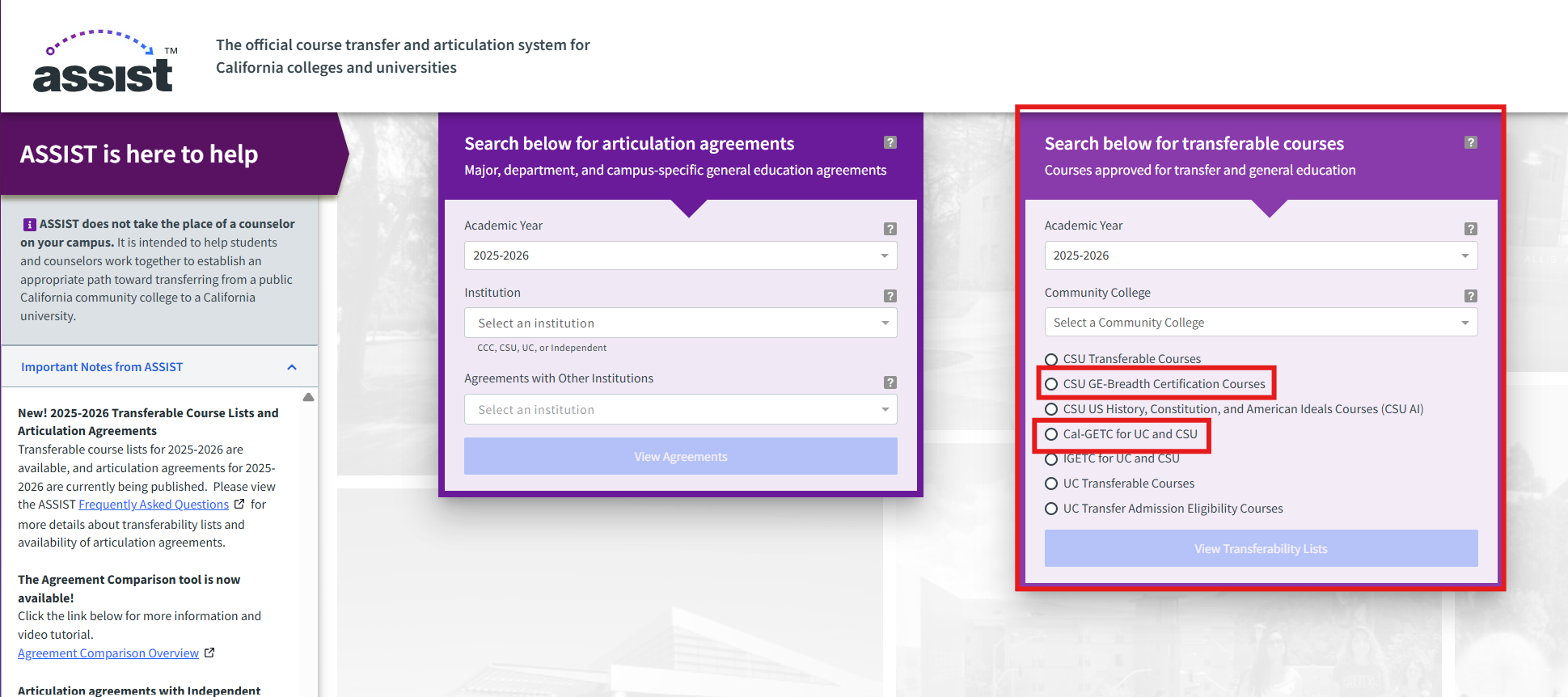
- Assist.org video.
- Step by step assist.org handout for finding a GE course.
- Prefix mapping chart.
- For those on GE 2020- present catalogs:
- Of the three courses required in Area D, there must be at least two different subject prefixes. To ensure you’re not duplicating prefixes in any remaining Area D coursework, use the Prefix Mapping Chart in the section below to determine what subject prefix Cal Poly will consider your transfer course to be.
- EXAMPLE: If you took a HIST course for D1, and a HIST course for D2, your UD-D GE must come from a different prefix (not HIST).
- NOTE: Students on the High Unit GE template (CENG, ARCE, and BRAE) (for catalogs prior to 2026) are not held to the prefix requirement in Area D.
- Prefix Mapping Chart (PDF)
- Of the three courses required in Area D, there must be at least two different subject prefixes. To ensure you’re not duplicating prefixes in any remaining Area D coursework, use the Prefix Mapping Chart in the section below to determine what subject prefix Cal Poly will consider your transfer course to be.
- For those on GE prior to Fall 2026:
- When taking a GE Area C, please review the prefix mapping chart to ensure you are not taking a course within the same prefix.
- C1, C2, and the lower-division C elective must come from three different subject prefixes. To ensure you’re not duplicating prefixes in any remaining lower-division Area C coursework, use the Prefix Mapping Chart in the section below to determine what subject prefix Cal Poly will consider your transfer course to be.
- EXAMPLE: If you took a MUSIC (MU) class for C1 and take another C1 for your C elective, then you cannot take another MUSIC (MU) class for that category. When credit is transferred in from other schools, it may transfer as a different prefix based on which prefixes are available at Cal Poly.
- Prefix Mapping Chart (PDF)
- When taking a GE Area C, please review the prefix mapping chart to ensure you are not taking a course within the same prefix.
- For those on GE 2020- present catalogs:
-
- If you're searching for GE course equivalents, select "Cal-GETC for UC and CSU"
- Contact an advisor if you want to confirm your decision.
- First year students can email the Mustang Success Center.
- Transfer students and continuing students can email your college advising center.
- Go to the external college/university website for questions about applying, enrolling, course options, dates, financial aid, placement, or prerequisites.
- Enroll in the course(s) you'd like to take.
- Once your course is completed and your final grade is posted on your academic record, request that the community college send your official transcript directly to Cal Poly. Learn how to send official transcripts to Cal Poly. Remember that it can take up to two terms for the credit to be applied to your degree progress report.
Timeline/Deadlines
Once the final grade is posted, send the official transcript as soon as possible. The Transcript processing timeline is outlined on this site.
Supportive videos and documents
General Education (GE) Area D1/4A course
When Cal Poly students take a D1/4A at Cal Poly, it is designed to fulfill all three required components. However, when students take our D1/4A course at a community college, they may need to complete two to three separate courses to satisfy the same requirement.
Things to consider beforehand:
- The D1/GE 4A requirement is mandated by the CSU/State and must incorporate three components outlined on the Office of the Registrar's website.
- Once your official transcript is sent to Cal Poly, it can take up to two terms for the transfer credit to be applied to your academic record by the Office of the Registrar. Review the processing timeline.
- This may impact your ability to enroll in future classes that require completion of the D1 GE/GE 4A as a prerequisite.
- Be sure to not repeat course content that you already have college credit for, even if the existing credit is not covering another requirement (already in free elective area).
How to Search for Cal Poly D1/GE 4A Credit on ASSIST:
- Make sure you select the correct academic year.
- Select the California Community College from the drop down menu.
- Select: CSU US History, Constitution, and American Ideals Courses.
- Be sure to read all of the information on the Assist website prior to selecting course.
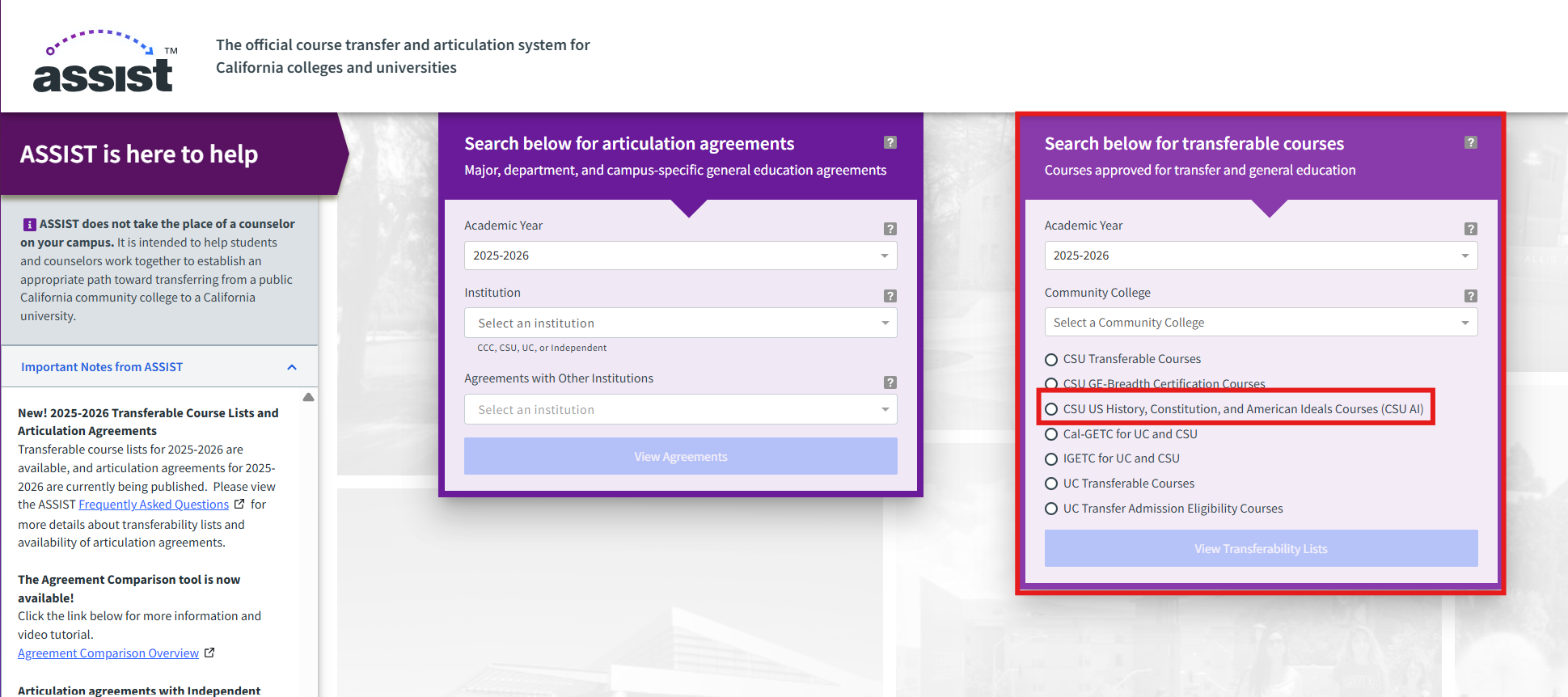
Process
- Use Assist.org to locate potential classes or partial credit at another California public college or university. GE Area D1/4A classes are often broken into 2 or more courses at other institutions. Review the video and handout below to understand how to find transferable D1 courses.
- Contact an advisor if you want to confirm your decision.
- First year students can email the Mustang Success Center.
- Transfer students and continuing students can email your college advising center.
- Go to the external college/university website for questions about applying, enrolling, course options, dates, financial aid, placement, or prerequisites.
- Enroll in the course(s) you'd like to take.
- When you complete the course and your final grade is posted on your academic record, request that the community college send your official transcript directly to Cal Poly. Learn how to send official transcripts to Cal Poly. Remember that it can take up to two terms for the credit to be applied to your Cal Poly record.
Timeline/Deadlines
Once the final grade is posted, send the official transcript as soon as possible. The Transcript processing timeline is outlined on this site.
Supportive videos and documents
- Assist.org video
- Step by step assist.org handout for finding a D1/4A course
- More information about the evaluation of transfer credit
Major or support course
Things to consider beforehand
- Once your official transcript is sent to Cal Poly, it can take up to two terms for the transfer credit to be applied to your academic record by the Office of the Registrar. Review the processing timeline.
- This may impact your ability to enroll in future classes that require your transfer class as a prerequisite. If you have concerns, we recommend that you talk to an academic advisor prior to enrolling at the external college/institution.
- Community colleges do not offer upper-division credit. If you are hoping to fulfill an upper-division requirement, you need to obtain department approval prior to enrolling at the external college/institution.
- Be sure to not repeat course content that you already have college credit for, even if the existing credit is not covering one of your needed GE requirements.
Process
- Determine the major or support course requirement you want to satisfy.
- Review your curriculum sheet and degree progress report (DPR).
- Use Assist.org to locate potential classes at another California public college or university.
- Assist.org video.
- Step by step assist.org handout for specific course.
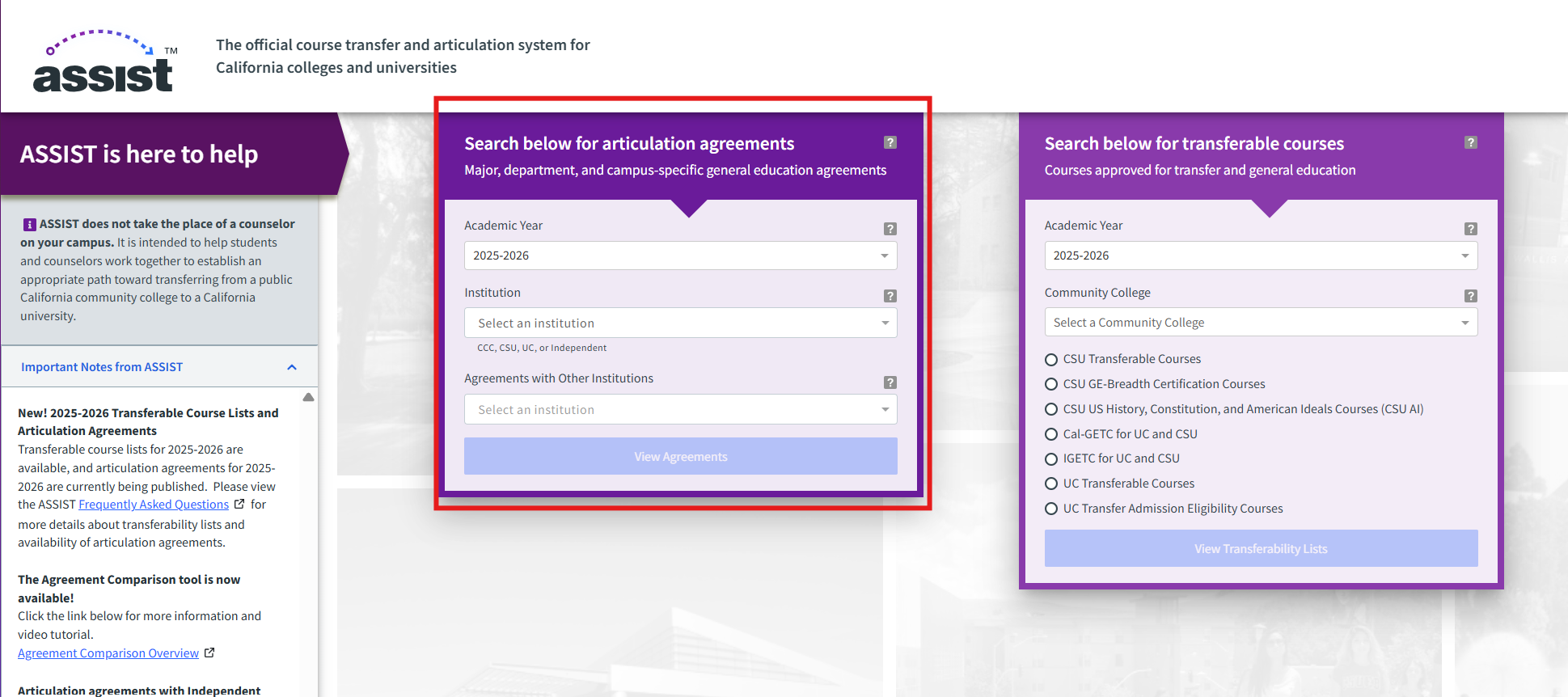
- Make sure you choose the academic year in which you are taking or took the course.
- Select the community college from the "Institution" drop-down menu.
- Select California Polytechnic University, San Luis Obispo from the "Agreements with Other Institutions" drop-down menu, then click View Agreements.
- Cal Poly Maritime Academy Solano Campus please select ;
California State University, Maritime Academy.
- Cal Poly Maritime Academy Solano Campus please select ;
- On the drop-down menu "View Agreements by:" select "Department" or "Prefix" then click View Agreement.
- REMINDER: if you repeat a class you already took at Cal Poly, or you have credit for with AP test credit, you cannot earn units twice or receive for grade forgiveness.
- Contact an advisor if you want to confirm your decision.
- First year students can email the Mustang Success Center.
- Transfer students and continuing students can email your college advising center.
- Go to the external college/university website for questions about applying, enrolling, course options, dates, financial aid, placement, or prerequisites.
- Enroll in the course(s) you'd like to take.
- When you complete the course and your final grade is posted on your academic record, request that the community college send your official transcript directly to Cal Poly. Learn how to send official transcripts to Cal Poly. Remember that it can take up to two terms for the credit to be applied to your Cal Poly record.
Timeline/Deadlines
- Once the final grade is posted, send the official transcript as soon as possible. The Transcript processing timeline is outlined on this site.
Supportive videos and documents
- Assist.org video
- Step by step assist.org handout for specific course
- More information about the evaluation of transfer credit
Free Electives Options
The class must be CSU transferable.
- Make sure you choose the academic year in which you are taking or took the course.
- Select the community college from the "Institution" drop-down menu.
- Under Transferable Courses, select: CSU Transferable Courses, then click the View Transferability Lists button.
- On the menu at the top of the next page "View Transferable Courses by:" select "Department" or "Prefix."
-
If the class appears on the list, it is CSU transferable. If the class does not appear on the list, it is NOT transferable and cannot be used for free electives. You must also check the articulation of the class to be sure you are not repeating a class you already have credit for. Ask an advisor for support with this to verify.
-
Be sure to not repeat course content that you already have college credit for, even if the existing credit is not covering one of your needed GE requirements.
Resources to Search for Transferable Courses
Assist.org (within California)
ASSIST does not take the place of an advisor or the Office of the Registrar at Cal Poly. It is intended to help students and advisors work together to establish an appropriate path toward transferring from a public California community college to a California university.
Articulation is the process of formally recognizing how coursework completed at one college or university can be applied to meet course requirements at another institution. It is recommended all articulation agreements be used in conjunction with the Cal Poly Catalog, which will indicate the most up-to-date curriculum. Articulations are updated and republished every year, and Cal Poly will honor what is listed in each articulation. Agreements for the new school year are typically posted August-October
Cal Poly San Luis Obispo and Cal Poly Maritime Academy students will continue to search for transferable articulations based on their campus location until Fall 2028.
Refer to the center box "Search below for articulation agreements".
- Make sure to choose the academic year in which you are taking or took the course.
- Select the community college from the "Institution" drop-down box.
- Under "Agreements with Other Institutions", select “California Polytechnic University, San Luis Obispo” as the home Institution.
Course-to-course articulation can be viewed three different ways:
- Articulation by Major
- By Major agreements contain helpful transfer information and online resources, as well as listing lower-division courses pertinent to that major.
- Can see all majors from that school by clicking "All majors".
- Articulation by Department
- By Department will list courses alphabetically, by prefix. This view may show courses under a variety of prefixes. For example, Biological Sciences lists Biology (BIO), Microbiology (MCRO), and Marine Science (MSCI) courses, as they all reside within that department.
- Can see all majors from that school by clicking "All departments".
- Articulation by Prefix
- By Prefix will show articulation for that specific subject prefix. (example: MATH for Mathematics).
- Please note, when searching for a specific articulation by Prefix, you should remember to check all associated prefixes. For instance, a Community College Mathematics course may articulate with a Cal Poly STAT course rather than a MATH course.
- Can see all majors from that school by clicking "All prefixes".
- For Cal Poly Maritime Academy students, where earning a USCG licensure is a degree requirement, courses designated STCW (i.e., courses where students must demonstrate competencies or sign-offs required for licensure) or sea-time equivalent must be completed at Cal Poly Maritime Academy while an active member of the Corps of Cadets. No transfer credits will be accepted for those courses.
If the class appears on the list, it is CSU transferable. If the class does not appear on the list, it is NOT transferable and cannot be used for free electives. You must also check the articulation of the class to be sure you are not repeating a class you already have credit for.
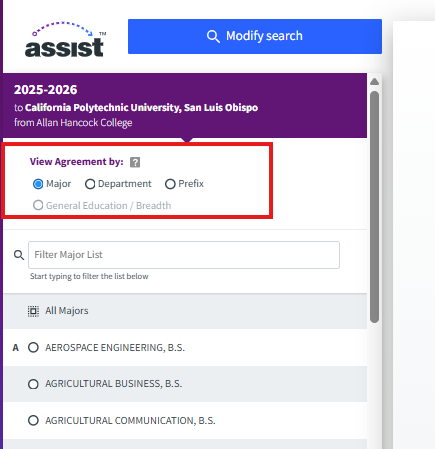
Searching for online class options | California Virtual Campus | CVC
California Virtual Campus (CVC) is a database of online courses across community colleges and 4-year schools in California. These include mostly asynchronous and synchronous courses and a few hybrid classes.
At this time, GE courses are searchable, but the "search by home college course name" feature currently is not updated and will therefore not show any classes.
Process - How to search for GE courses (outside of GE Area D1/4A):
- Visit CVC.edu and scroll down to the search criteria.
- For the Home California College, select any community college from the list.
-
Search by "Gen Ed Requirements".
-
If you are on the 2022-2026 catalog, search by "CSU BREADTH Requirements".
-
If you are on the 2026-2028 catalog, search by "Cal-GETC Requirements".
-
- Select any GE that apply to the class you're looking for under "Select a requirement".
- NOTE: If you are planning to take a GE Area D2 course, or GE Elective for Area D, you can choose any class in the D-D9 categories. The new GE pattern is now labeled 4B.
- Search by clicking "Find Classes".
- On the search page, select the appropriate filters on the left (i.e. online format, term being offered).
- Select a class to see more details, including course description, transferability, format of classes, and meeting times (if applicable).
- Note: We recommend checking the transferability of a class with assist.org as it is the official place to display California Community College articulations. You are also encouraged to check with a Cal Poly Academic Advisor to confirm transferability.
- Scroll down on the page and select "add class" once you've made your selection. If it takes you to the "cvc course exchange" page, you can add the class using any pre-existing California Community College portal that you have set up. If not, you will need to create a portal by applying for the college at CCCApply.
- Once you are officially enrolled in the class, make sure to note when the course starts (also shown on CVC), and send transcript(s) when the course is completed.
Timeline/Deadlines
Once the final grade is posted, send the official transcript as soon as possible. The Transcript processing timeline is outlined on this site.
Supportive videos and documents
- More information about the evaluation of transfer credit
Taking courses at an out-of-state institution
Major or support course
To satisfy a major/support course at Cal Poly by taking a course at an out-of-state institution (community college or 4-year institution), you will need to get it approved prior to taking the course.
Process
- Identify the requirement you would like to satisfy at Cal Poly.
- Review your curriculum sheet and degree progress report (dpr).
- Read the course description at catalog.calpoly.edu under the "Courses A-Z" tab.
- At the desired institution, search for a course that has very similar course description and similar prerequisites (if applicable) and/or course level.
- The description should address nearly all the same concepts as the course at Cal Poly.
- You are encouraged to check in with your faculty advisor or college advising center to make sure the course is a good candidate for potential substitution prior to enrolling.
- Once you have found the course and confirmed that it is being offered at that school during the desired term, you will need to fill out a “Major/Support Substitution Form.”
- Form for Major/Support substitution found at registrar.calpoly.edu/registrar_forms.
- Fill out the form, obtain the necessary signatures, and attach the course description of the external course. You will then need to wait to hear if the substitution has been approved. Please allow at least 2-3 weeks for this process.
- Go to the external college/university website for questions about applying, enrolling, course options, dates, financial aid, placement, or prerequisites.
- Enroll in the course at the external college/institution.
- Please ensure you receive written confirmation indicating that approval was granted before taking the course.
- When you complete the course and the final grade is posted on your academic record, request that an official transcript from that institution to be sent to Cal Poly. Learn how to send official transcripts to Cal Poly.
Timeline/Deadlines
Once the final grade is posted, send the official transcript as soon as possible. The Transcript processing timeline is outlined on this site.
Supportive videos & documents
General Education (GE) course
To satisfy a General Education course at Cal Poly through an out-of-state institution (community college or 4-year institution), you will need to get it approved prior to taking the course.
- Identify the GE requirement you want to satisfy.
- Review your curriculum sheet and Degree Progress Report
- Locate the GE pattern or list at the college/university you are interested in attending. Save that link for future reference.
- Find a GE area at the transfer college that seems the most similar to the GE area you are trying to fulfill at Cal Poly, and select a class(es) from that GE area list . Copy the description of the course and email evaluations@calpoly.edu to check if it will transfer. Be sure to send from your Cal Poly email address and include the following:
- Your name, Cal Poly EMPL ID, and major
- Name of school where you are taking the class
- GE Area you are trying to satisfy
- Course prefix and number
- Course title
- Number of units
- A link to the course description
- A link to the transfer school's General Education (GE)/Core courses requirement list
- When you need to register
- Find a GE area at the transfer college that seems the most similar to the GE area you are trying to fulfill at Cal Poly, and select a class(es) from that GE area list . Copy the description of the course and email evaluations@calpoly.edu to check if it will transfer. Be sure to send from your Cal Poly email address and include the following:
- Go to the external college/university website for questions about applying, enrolling, course options, dates, financial aid, placement, or prerequisites.
- Be sure you are not repeating a course you already have college credit for, even if the existing credit is not covering one of your needed GE requirements.
- Enroll in the course at the external college/institution.
- Please ensure you receive written confirmation indicating that approval was granted before taking the course.
- When you complete the course and your final grade is posted on your academic record, request that the community college send your official transcript directly to Cal Poly. Learn how to send official transcripts to Cal Poly.
Timeline/Deadlines
Once the final grade is posted, send the official transcript as soon as possible. The Transcript processing timeline is outlined on this site.
Taking courses at external institutions over the summer
External Summer Options
Taking summer classes is a great way to make progress toward your degree and can be a personal choice that many students make. Most students are able to take summer courses at external colleges/institutions over the summer without issues. However, there are some important things to consider before you enroll:
- Many schools have calendars that do not align perfectly with Cal Poly’s calendar. This means that you should check to see if there is any overlap with our Cal Poly courses and consider how that might impact your workload (especially if the courses overlap over finals at the end of the year).
- If you are interested in taking courses at another institution that are prerequisites for future Cal Poly courses, you will need to factor in the transcript processing timeline and possible delays.
- Check with your department about whether they’d be willing to let you enroll conditionally in the next sequenced course. Some may be comfortable with this and ask that you verify your passing grade before being able to proceed, but some may not.
- There may be differences in the way that curriculum and content are taught at other schools. If you are taking major or support coursework, talk with an academic advisor or faculty advisor about which courses they may or may not recommend taking elsewhere.
Submitting Transcripts for Transfer Credit
Instructions for Sending Credit
Currently Enrolled Cal Poly Students:
Check the Evaluations Form and Transcript Processing Timeline to see when transfer work is reviewed. Once the official transcript has been evaluated, credits will be added to the student’s record and will be viewable on the Degree Progress Report.
How to Send Transcripts from Another School
Once you have completed course(s) from another institution, you can send transcripts via one of these ways:
- Parchment. If your school is registered with Parchment, please select Cal Poly San Luis Obispo as your institution and your transcripts will be sent directly to us.
- Other electronic transcripts: If your school uses another certified provider other than Parchment, please have those transcripts sent directly from your institution to cptrans1@calpoly.edu.
- Mail: Order an official copy of your transcript from the community college and have it mailed to the address below.
-
Cal Poly
Transcript Processing
MC 1001
1 Grand Avenue
San Luis Obispo, CA 93407
-
Cal Poly
After Cal Poly receives and evaluates your transcript, the units and GPA will be calculated on your Poly Profile, and the credit will show on your DPR. Approximate processing time is 1-2 terms.
Final Transcripts Required:
The Evaluations Unit requires students to send transcripts from ALL external colleges and universities where enrollment has occurred, even if those courses are not needed to count towards the Cal Poly degree. The Evaluations Unit will not award a student’s degree until all transcripts are sent with final grades/resolution.
Final grades/resolution may be a letter grade, a grade of W, or the removal of the course from the transcript. If a transcript is received with “in progress” grades, Evaluations will hold for the final grades/resolution, even if a student withdraws or fails.
Still have questions? Contact Evaluations:
Cal Poly San Luis Obispo
evaluations@calpoly.edu
Phone: 805-756-2396
Cal Poly Maritime Academy
registrar-maritime@calpoly.edu
Phone: 707-654-1200
Helpful Resources
| Topic | Where to Find More Information |
|---|---|
| AP/IB Matrix | AP/IB Credit |
| Assist.org | Assist.org website |
| CVC.edu | CVC.edu website |
| Degree Progress Report (DPR) | DPR website |
| Financial Aid | Financial Aid website |
| General Education (GE) | General Education (GE) website |
| Prefix Mapping Chart | Prefix Mapping Chart (PDF) |
| Sending Transcripts to Cal Poly | Transcript website |
| Understanding your curriculum | Curriculum sheets & flowcharts |
| Unofficial transcript | Portal > Student Center > Student Records > View Unofficial Transcript |
For students on the 2019-2020 or earlier Cal Poly Catalog
Below is a chart of GE Areas for the 2019-2020 or earlier catalogs
| GE on Assist | Cal Poly GE Area |
|---|---|
| A1—Oral Communication | A2—Oral Communication |
| A2—Written Communication | A1—Expository Writing |
| A3—Critical Thinking | A3—Reasoning, Argumentation, and Writing |
| B1—Physical Science | B3—Physical Science |
| B2—Life Science | B2—Life Science |
| B3—Laboratory Activity | B4—Laboratory Activity |
| B4—Mathematics | B1—Math / Statistics |
| C1—Arts | C3—Fine and Performing Arts |
| C2—Humanities *NOTE: No more than 8 units total of foreign language acquisition courses can count in Area C. |
C1—Literature C2—Philosophy
|
| D0—Sociology and Criminology D1—Anthropology and Sociology* D2—Economics D3—Ethnic Studies D4—Gender Studies D5—Geography D6—History D7—Interdisciplinary Social or Behavioral Science D8—Political Science, Government, and Legal Institutions D9—Psychology |
D2—Political Economy
|
| E—Lifelong Understanding and Self-Development |
D4—Self Development (Cal Poly Catalogs prior to 2019-2020) E—Self Development (2019-2020 Cal Poly Catalog) |
The information outlined above can also be found on the PDF of How to Use Assist.